Please confirm you are at least 18 years old of age. Otherwise leave the website.
Sign up
Log in
Oct 17, 2026 02:29 pm
Public post
This content was created for artistic and entertainment purposes FOR ADULTS ONLY and may include pictures and materials that some viewers may find offensive. If you are under the age of 18, if such material offends you or if it is illegal to view such material in your community please exit the page IMMEDIATELY. All depicted characters are fictional. No live victims were produced during this content creation and no harm was imposed upon any live creature. All characters depicted in sexual situations are 18 years of age or older and of the age of consent, even if it looks otherwise. Acts depicted are all consensual.
18
You can view this content for free after you Log In or Sign Up.
Hey everyone!
This update is actually much bigger than it may look at first. Let’s go one by one.
Funscript heatmaps 🌡️
The funscript renting screen can now show you a heatmap. It’s hidden by default and only revealed when you explicitly ask for it, since in theory it can be considered a spoiler if you haven’t seen the video yet.
And once shown, it’s not just a general idea of where the fast and slow parts are. You get a legend with the actual speeds, and you can hover over the heatmap to see the exact speed at that moment. Pretty neat, right? Currently the heatmap shows only there, but it’s not a problem to add it elsewhere too. I’m not really sure how important this is to you, so let me know in the comments if there are other places you’d like to see it.
Vibration safety stop is now off by default
Another quick change to funscripts and toy control in general: the vibrating safety stop feature is now disabled by default.
Turns out this feature doesn’t really make sense. When I first added it, I simply didn’t have enough experience with toys and funscripts, and back then it seemed like a good idea. But funscripts for vibrating devices and funscripts for automated strokers are just too different. It makes no sense to use a vibrating device with a funscript made for strokers, and vice versa. Worse, the feature was actively sabotaging funscripts made specifically for vibrating devices. Hence the change.
If you find it useful and want to keep it, you can still enable it back in the settings.
Website improvements
I have my own blog now 💪 What does this mean? Freedom. No guidelines dictating what I can and cannot post there. I’ll try to keep the posts as uniform as I can, but differences will occur, starting with this very post: the version on the web contains sauce links, which I can’t put on Patreon.
Tier refresh button. Since funscripts are now a thing, a few of you decided to upgrade your membership (thank you, really!), but the change was not automatically picked up. Your tier was only evaluated on login, so you had to sign out and back in, which was not really obvious. There’s now a simple refresh button in your profile you can hit right after upgrading.
Funscript filtering. Same as on the video page, you can now filter funscripts for Patreon exclusive videos.
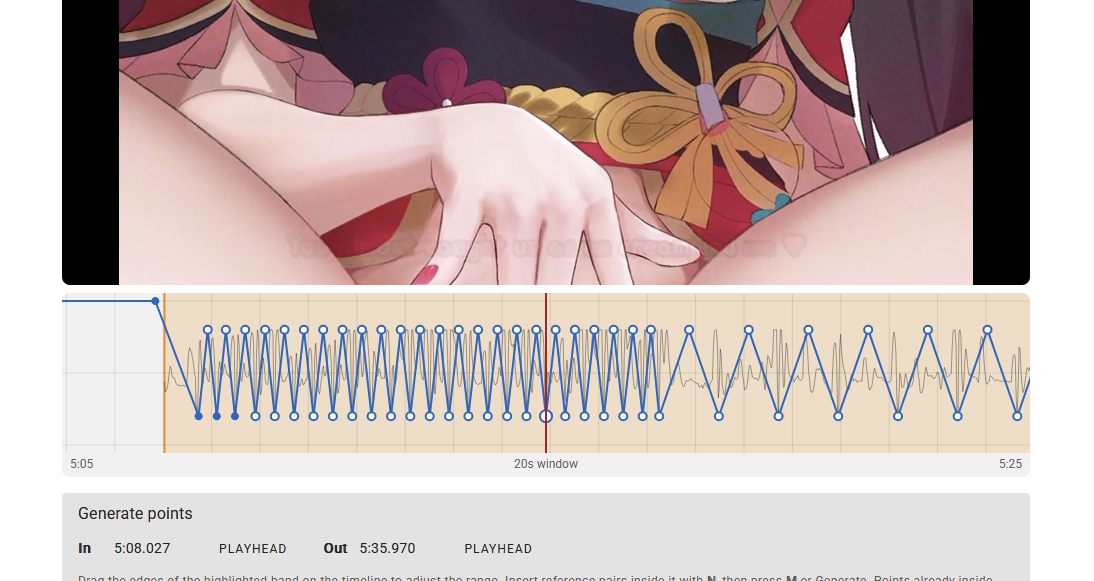
The funscript maker got a hell of an upgrade 🤖
It can now detect beat bars in certain videos and create points according to them. All fully locally in the browser. No hallucinating AI needed, just pure algorithms, math and computer vision.
And the same goes for audio. Manually inserting points at the moment I hear a beat turned out to be way too much pain, so I explored whether the sound could be detected and the beats identified automatically. After all, a beat is a pretty sudden change in the audio, it should be detectable, right? Guess what. It is 💪💪💪
The funscript maker is shaping up really nicely and I’d like to release it publicly at some point, but it’s too soon for that. I built it as my internal tool only, and currently it’s not very intuitive. If you don’t know how to operate it, you might have quite a hard time figuring it out.
Payment processor... actual progress?! 💳
I might have finally made some progress on the payment processor. It seems I was finally able to get past the eternal “Will you process for my website?” question and actually start setting up the account and dealing with the integration.
I’m not gonna lie, I’m quite hyped that any progress was made here. But I intend to approach this with the utmost care. After all, your money will be involved. No mistakes are allowed here.
And lastly... some pesky bugs 🐛
Turns out a few bugs were hiding for quite a decent amount of time. Peak video was broken. Remember Wanna Play C.U.M Game from HoloJoi? Part of the game was broken: buffs and debuffs were not applied correctly, and in some cases the player position could glitch and render in the top left corner instead of the correct tile. All of this is now fixed and the video works properly again. Hopefully. 😅
And... If for any reason you have not seen this video, you should definitely change that! Oh and by the way, did I mention that in this video all the TJC features are completely free for everyone? Meaning that you get the full experience of the board game mechanics with TJC without a membership. However, this will not be the case with the upcoming Wanna Play CUM Game LVLUP video so you can try the first video so you know what you will be missing out.
But lesson learned. With the constantly growing catalog it’s simply not possible to reliably test every video by hand, so I’ll need to add some crash reporting that can detect a TJC crash and tell me which video needs my attention. That’s a task for the future though.
There are more changes, but I believe this post is already long enough, so let’s save those for next time.
Now, if you’ll excuse me, I have a bunch of videos to sync and funscripts to make, so I better go cooking. 🍳
SubscribeStar and its trusted third parties collect browsing information as specified in the Privacy Policy and use cookies or similar technologies for analysis and technical purposes and, with your consent, for functionality, experience, and measurement as specified in the Cookies Policy.


 Log in