

 Log in

Devlog - Candles, Triggers, and More...
More progress has been made towards the game engine. A lot of little stuff that make a big difference in the grand scheme of things. I still have more combat work to do, but these are also vital features -- and still valuable even in a game without actual combat.
Game Over / Checkpoints
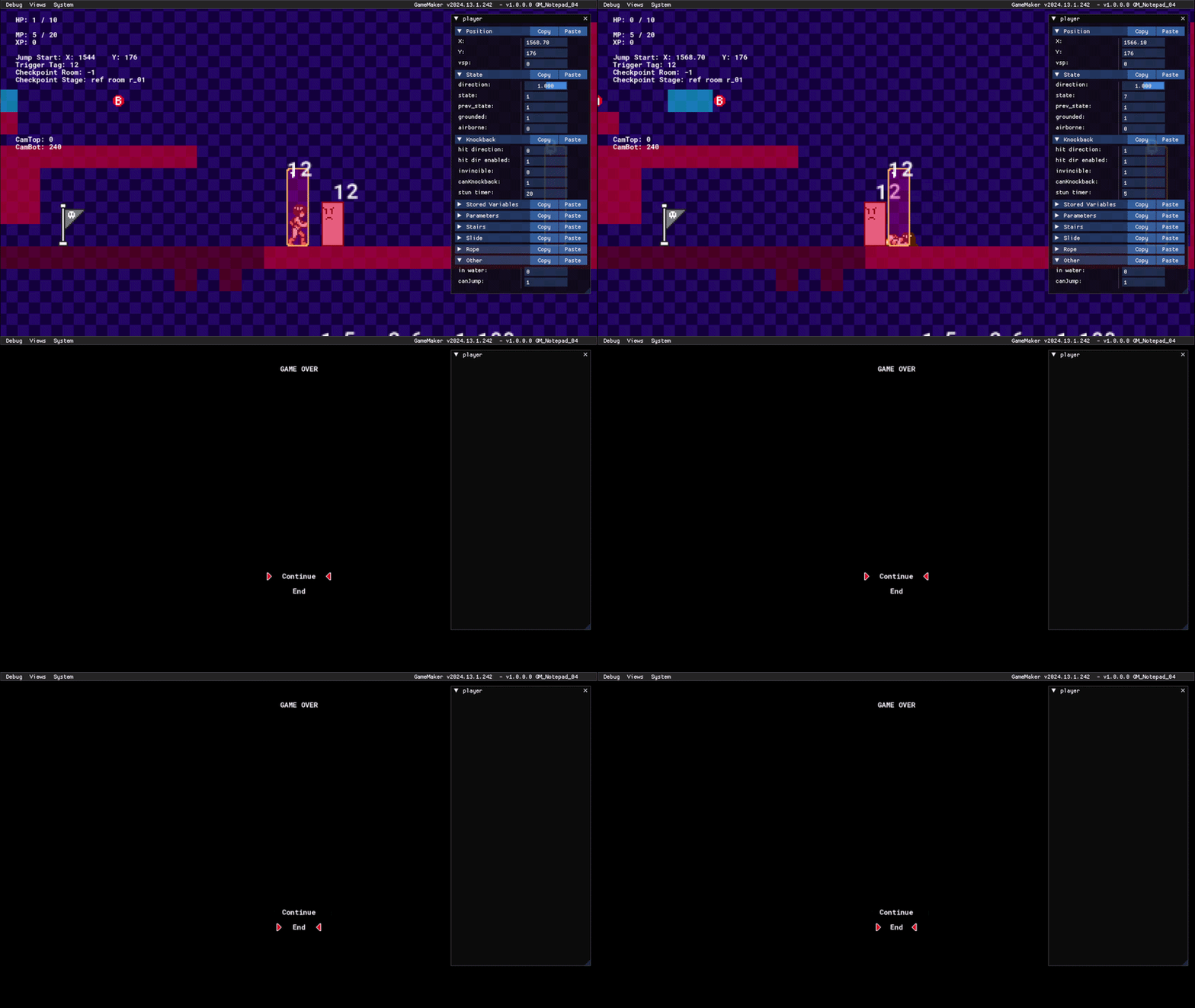
The player character is now capable of dying & respawning at checkpoints, and it all works mostly correctly assuming a checkpoint has been activated.
I'll need to update the font, but I think the way I'm drawing text has also resulted in it looking much smaller than in the old engine due to scaling quirks with the GUI Surface. It also does not yet have the capability to display illustrations yet -- but at least the selection option is a bit more fancy (we have TWO arrows now - and they're animated).
Candles:
These objects contain various loot (money, life, ammo) (sub-weapons don't exist yet). Upon destruction, they will drop their contained loot. Player Attacks are not yet implemented, so I have been testing it with a simple mouse-click.
Making them work is super simple. All I have to do is place "o_candle" in the room editor, then open up its variable definitions window to change its properties. I can change the type of item as well as the value provided (like the amount of money inside a dropped coin).
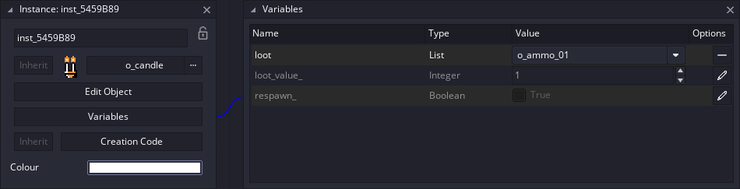
But I can streamline this process even further so that it's visual, functioning akin to designing a level in Mario Maker: simply dragging a power-up into a Question Block in the level editor.
So now candles will update their properties during the Room Start Event by reading any loot objects placed directly above it. So I never need to scope into an object's variables unless I specifically want to change an object's value. I use similar automation in the next feature too.
Although other features will be needed first, this can also be used to hide items in walls.

Trigger Tag - Expanded:
I previously talked about my Trigger Tag system last week, but I've since expanded upon it.
For context: trigger tags can link objects together. If a Trigger Zone and an Enemy object have the same tag, then touching the Trigger Zone will activate the enemy. To use trigger tags, I had to open each object in the room editor, then access their variable definitions window so I can manually type their trigger tag ID. This requires 3+ clicks per object, and it's impossible to see if an object even has a trigger tag without doing this every time.
So, I created a system that is purely visual (as far as the development process is concerned).
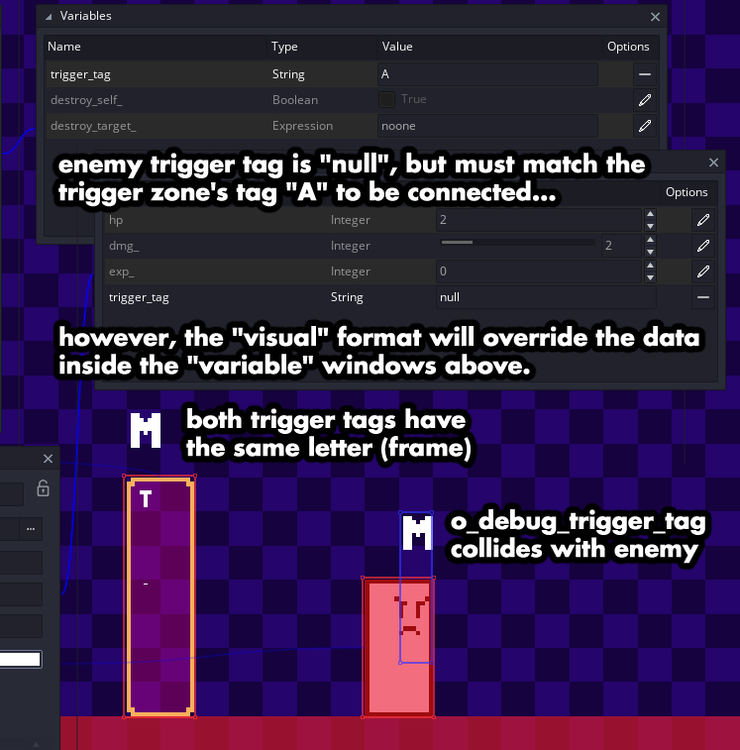
Using a newly-made script, objects can now automatically assign their own Trigger Tag during the "Room Start" Event. All I have to do is place two objects near each other for it to work.
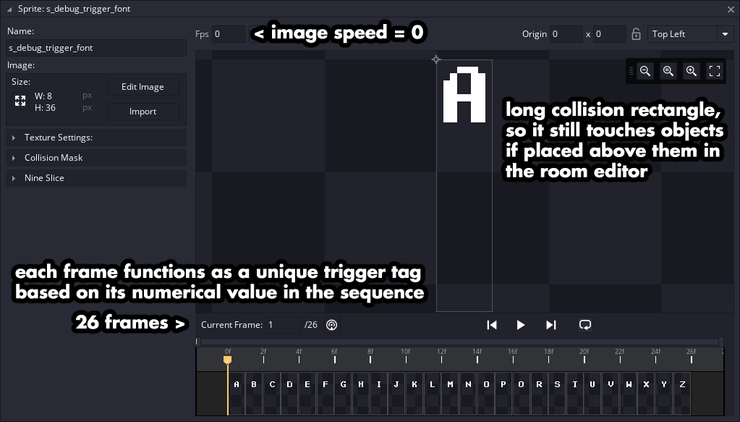
After creating a new object "o_debug_trigger_tag", which contains 26 sub-images (each with a different letter of the alphabet) as part of its animation sequence (which never plays), I can hand-place these objects in the Room Editor next to those objects and change its animation frame to determine a letter tag (which translates to a numerical value 0 - 25). Then, when the room starts, these objects (like enemies) will update their "trigger tag value" to match if they are touching this new trigger tag object. The trigger tag object is destroyed afterwards, so it no longer lingers in the room itself.
New Script: change_player_hp(_amount):
Whenever I changed the player's HP in the old engine, I would simply add / subtract a value in relation to its current value. Then I'd cap the value with a variable check: "if hp is greater than max hp, force hp to drop down to max hp." This solution worked, but risks showing players the value update in real-time (depending on the order at which the code runs).
The new engine no longer has that issue, with a newly-created function (I've been making and using functions a lot more this time around). I run this function every time any object changes the player's HP; determining a minimum and max HP value before HP is changed, so the value never goes above or below the cap, and thus, never needs real-time adjusting.
I am also using this system for ammo too, though sub-weapons are not yet implemented.

Don't forget to eat & sleep.