

 Log in
Devlog - Cams, Pauses, and Warps
(video embedded below)
https://www.youtube.com/watch?v=JKvZ_NZoPEg
------------------------------------------
After a lengthy period of inactivity, its always hard to jump back into game development. But I have done so, and with the help of a few tutorials to smooth my entry back in. I'll share them so you can check them out if you're interested.
This week saw progress in three key areas:
- Smooth Camera System
- Pause Feature
- Room Warping
-
Smooth Camera System
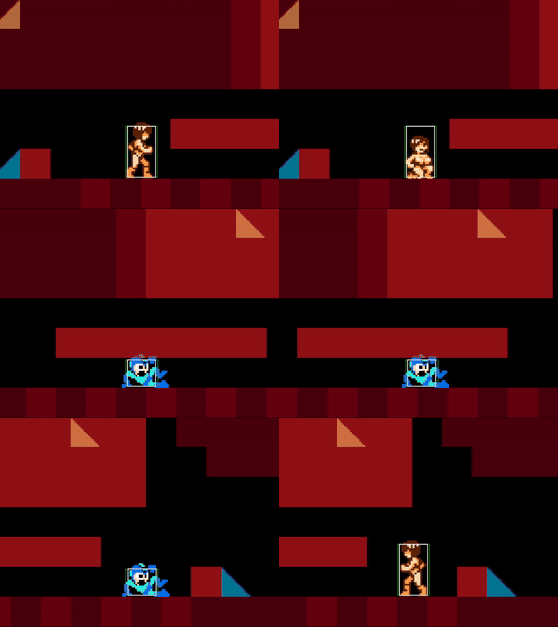
Although it's hard to tell from gifs with a low frame rate, my old camera system wasn't working properly in my new gamemaker project. I'm not entirely sure why (because it works within my old project file), but I fixed it by moving code in my [Step] Event to the [End Step] Event.
The player character moves 1.3 pixels every frame (like Megaman), but the built-in camera for Gamemaker can only move in integers (or whole numbers without decimal points). This means the camera can't keep up with the player, causing the character to vibrate while they move.
I won't spend much time explaining this system because I haven't coded anything new, but I will share two examples of a smooth camera system -- which have a lot in common with my solution. PixelatedPope in particular spends a lengthy amount of time explaining everything, with visuals, in a way that is easy to understand for a non-coder.
-
Pause Function
My old pause functions were a bit messy, using different solutions for different things.
For the primary pause feature:
- Display screenshot of game.
- Deactivate all game objects (hiding them, hence why we took a screenshot).
For dialogue:
- Make objects exit their [Step] event.
- ... This needed to be hand-placed into every single object I wanted to pause.
The latter solution actually results in a bug within my previous engine. If you press the Mel Talk button while on crumbling floor tiles, the tiles will break apart and kill the player mid dialogue -- because I forgot to tell that specific object to exit its code.
Funnily enough, PixelatedPope recently uploaded a video on the subject. In it, he outlines both cases and explains the possible problems they cause. As a result, I decided to use his design.
PixelatedPope's Approach:
- Create a "pause manager" object that runs 100% of the code.
- Assign a "CanPause" tag to every relevant object within the IDE.
- In the pause manager: DE-activate all tagged objects in the [Draw GUI End] Event.
- In the pause manager: RE-activate all tagged objects in the [Pre-Draw] Event.
For context: All objects process a sequence of events that run one after another. For instance: Create Event > Step Event > Step End Event > Draw Event > Draw GUI Event > etc... All of that happens between each frame of the game.
So we de-activate every object after it is drawn, skip the logic events, then re-activate before the draw events. As a result, we can prevent code from running but still draw the objects. My previous solutions are obsolete, as long as I don't put any "logic" code in the Draw Events.
I still need to see if this system can be easily plugged into other actions that pause the game, like dialogue and illustration displays. But it's an overall improvement, and it's good to get this done early so I'm not forced to refactor older code around it (and risk error like I did before). It's not really worth showing off, but it's part of the engine now.
PixelatedPope Video: https://youtu.be/8OeSMgBSau4
-
Room Transition System
I've also revamped my room transition system / warps / doorways / etc.
I assigned a target room and target X & Y coordinates, then moved those into a global variable (the entire game keeps track of these all the time). The exit objects load the new room and the player object is created at the target coordinates.
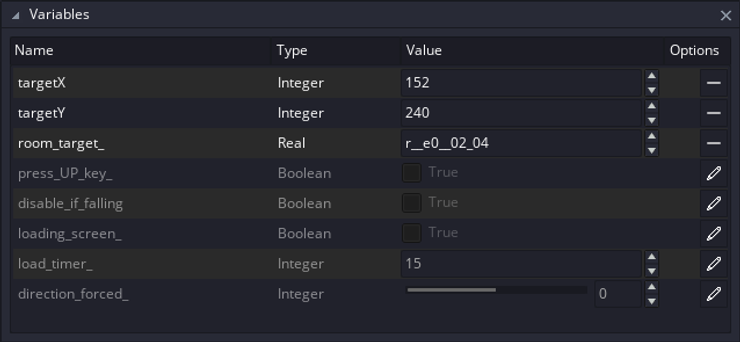
It worked great, but it was a lot of work to set up every time - especially if the target position is on a staircase (as I had to manually place the character inside each room and line them up with the stairs at the right angle to get the correct coordinates for each room transition).
So, I wanted to simplify this process, inspired by RPG Maker, Mario Maker, and ZeldaClassic. In my new idea, instead of manually writing down the coordinates for each room transition, I'd instead place an "entrance" object linked to the "exit" object in the previous room.
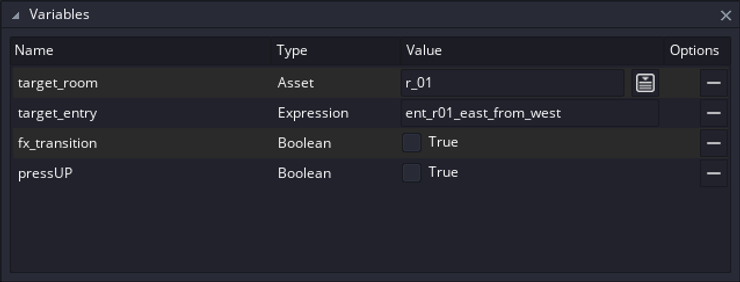
Using a persistent "room transition" manager, I can have the [o_room_exit] object refer to a specific [o_room_entry] object, and simply move the player to that position once the room is warped to. Conveniently enough, PixelatedPope had a tutorial for the same exact thing, albeit a bit more streamlined than my design -- using far fewer variables.
These systems still need a little tinkering, but they're the bulk of what's needed for the basic building blocks of a simple game environment in terms of basic mechanics. We now have: movement mechanics, smooth camera control, pausing, and room transitions.
It may be worthwhile creating a simple game that only contains platforming, however, so that we can properly test to make sure the new collision mechanics and upgraded systems work without any issues.
Don't forget to eat & sleep.