
 Log in
HOW TO SHARE YOUR ADDRESS WITH ME SO I CAN SHIP YOU STICKERS! :3
Hi! Thanks so much for being a part of my sticker club!! I LOVE designing new stickers every month and I love being able to send them to you all.
However, SubStar does make it a little trickier than Patreon to facilitate this. SubStar makes you take a few extra steps to share your address with me, even if I have a tier set to request your address.
SO this post is going to walk you through making sure your address has been shared with me so I can start (or continue!) to send you goodies each month!
Your UI might look slightly different than mine but hopefully it's mostly the same!
Start by using the dropdown menu at the top right, and select "Account Settings" from the menu.

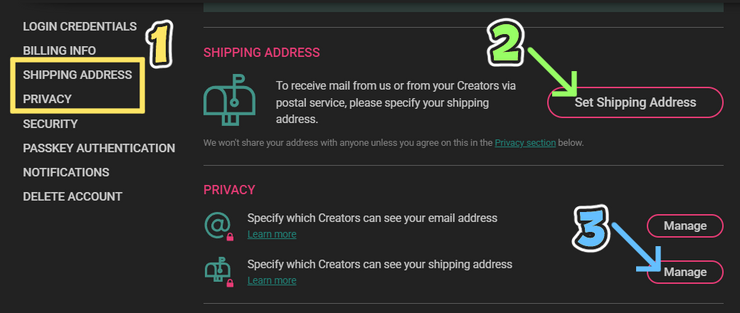
On this page, there will be several things to do.
1. First, click "Shipping Address" in the menu to the left, or scroll down to the Shipping Address section.