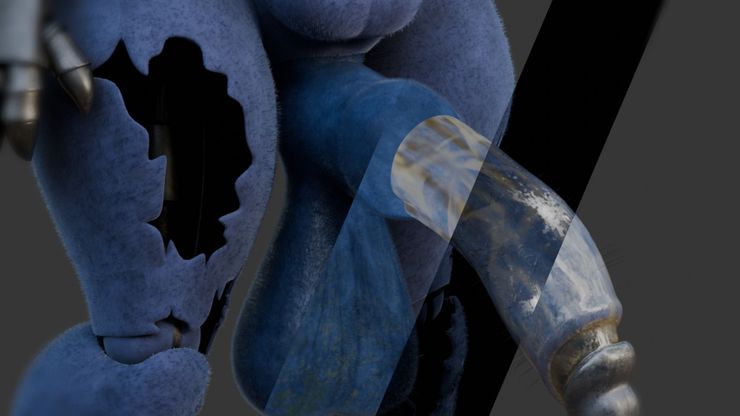
I've decided to open up a Subscribestar page, and will be using it for donations so I can keep chugging away and making NSFW art!
I'm unsure if I'll be uploading work-in-progress animations here so don't donate expecting to see them all the time - but I would like to publish breakdowns of some of my animations or techniques I've tried for those who are interested in learning!
Features
Support and allow me to continue making animations and art!
See detailed breakdowns of techniques used in my art
You can view this content for free after you Log In or Sign Up.
General life + animation update!
Hi guys! I know its been a while, I'm just giving a bit of a general update on how things are, and some info regarding some animations I'm working on at the moment.
Life stuff
Things have been reaaally busy on my end since I made those pride month animations. Secured myself a full-time job (its not amazing, but its a step up), made progress on receiving HRT, etc.
I had already been battling some creative burnout (I have been doing this for nearly 7-8 years at this point) on top of my ADHD prescription running out, and after finding out a very close friend of mine was homeless and struggling to survive while doing sex work - I put a lot of effort into helping her. While I won't go into any further detail on that, the stories I heard from her made it difficult to turn around and go back to making porn, especially with the more "dub-con" tone most of my animations have.
The end result of all of these thigns was me needing to take a break from NSFW for some time... While I can hopefully return to animation, it'll be a difficult balance between this and a 3D art job. I hope this all makes sense, and explains my lack of content, which I truly apologise for.
Animations
While progress is slow and interrupted, I have begun work on some more projects!
What originally started as a Mangle x Toy Bonnie animation with a horror-y theme (reminiscent of my Withered Bonnie animation) will likely have to be put on the backburner for now, as I'd like to put something out sooner rather than later and animation-wise its going to be a nightmare. Theres about 5-6 separate limbs for Mangle (as I decided to split her into pieces and hide her full body in shadow to give a sort of scary, unknowable feel) which must all be animated and managed separately, with multiple IKs and constraints interacting with Bonnie's body in different ways and at different speeds, which'll be tricky with the current state of Blender's animation tools... I have a habit of setting these ambitious projects for myself lol
The current ones I'm working are:
A Toy Chica animation involving rimming and anal. Just a short animation designed to repeat, as I've been wanting to do more rimming-focused content while also improving my animation to hopefully give it more of a plap, as I've always been a little jealous of animators who could do it really, really well (cough cough Vyne). This will also include a hair/pubeless alt since I know a lot of people don't like their asses and cocks with hair x3
A sloppy, looping animation with Toy Bonnie and Withered Bonnie. I'd always liked the version of WB I used in the horror-esque animation, but I always struggled to use her in actual sex animations for two reasons... 1: The cock is so damn large its hard to make it fit and 2: Her body is so thick and her tits are so large that its hard to pose her in a way that doesn't cause immense clipping or blocks the camera, which is an issue I've always found with thicc models.
This project should work around that, and it'll be a good opportunity to hopefully make it nice and sloppy, and make use of the saliva strands I've been experimenting with. This will hopefully have a first-person alt as well, for the fun of it.
I also wanna make some Marathon stuff since I love the game... but it'll take some time, both because of these projects... and the fact that the Marathon Model Ripping team has decided to wait about 1-2 weeks after the Cryo Archive update before releasing their ripping tools, as Bungie said they'd hire a death squad to murder people who post leaks should they find any while datamining...
In other news, I'm going to be trying out a new way of creating pubes that should hopefully be much better than my current attempts, utilising the newer geometry nodes and grooming system (like GuiMontag's art)rather than the old particle stuff I was stuck on. The end result will hopefully look a lot nicer!
"PlapMaster"
For the longest time, I've had to manually add sounds to my animations in my editing software of choice (After Effects) by going through frame-by-frame to see when contact is made, dragging a sound in, and moving on. This wouldn't be so bad, until you had to do that hundreds of times (especially for me, since I prefer to work in sound layers). I had begun work on a Blender tool that allowed you to keyframe the location of sounds and export those timestamps, where they could then (hopefully) be read by another custom tool in AE that'd procedurally place sounds there. Sadly Python/bpy is a bitch and I didn't manage to complete it. Maybe I'll try again in the future, but it was a fun lil experiment.
Breakdowns?
When I first started this substar, I mentioned that a main reason I went this route was that it allowed me to write extensive breakdowns on some of my projects. A Twitter thread would be too restrictive to explain properly, most other sites for writing probably wouldn't appreciate NSFW content and from what I learned in the past, most NSFW video sites don't appreciate hour-long tutorials (even if they get a fuckton of positive feedback)
I have two drafts related to the saliva strands and the water/pool I used for this animation which I'll hopefully work on and finish at some point, and I'd like to do a dedicated one on using the clearcoat and vertex painting to create grease or damp patches, though do let me know if theres any specific topic you'd want me to do a breakdown on!
Wrapping up
I think thats about all I really have to say regarding the state of things. Progress will likely be slow due to IRL situations, getting my shit sorted and a 9-5 3D art job, but I do want to get back into making art again, and maybe I'll do a mix of images and animation so theres not so big of a drought in terms of my output. Given how slow and unreliable things can be, I'd also like to apologise to anyone reading this who saw my artwork, decided to donate, and then unsubbed after seeing my substar was basically dead. I should've posted an update here sooner.
Anyway, I'm prob gonna air-fry some chicken for dinner, so I'll head off and see you guys another time when more progress has been made
You can view this content for free after you Log In or Sign Up.
Breakdown #1: Uncleaning Withered Bonnie
This is hopefully the first of many breakdowns or posts I plan to make detailing how I do things, or what I learned! I like to make my art and animation detailed while trying new things and challenging myself (even if I break stuff lol), so I figured it'd be fun to do a little writeup for those who are interested, or want to learn.
When working on the Withered Bonnie animation I had decided that it was about time I made that thing look filthy. I'd been worried that my followers wouldn't like it, but I decided to make it how I felt and have a clean version for those who didn't like it.
The issue is that for kinks like cock filth, cumflation, etc is that it requires a lot more work to do (e.g fluid simulation, smoke simulation, complex shaders). A lot of details go into making it look nice and I hadn't tried using them like this before. As such, while I often modify rigs and models when I animate with them to fix issues or make them easier to use, I had to do more extensive modifications in this case.
Texturing
Substance Painter is great for texturing. For things like leaky eyeshadow you can get away with Blender's default texture painting system, but it lacks a lot of texturing functionality that Substance just excels in. So I tossed that schlong into Painter and probably spent 5 hours texturing (including the changes I made over the course of the project).
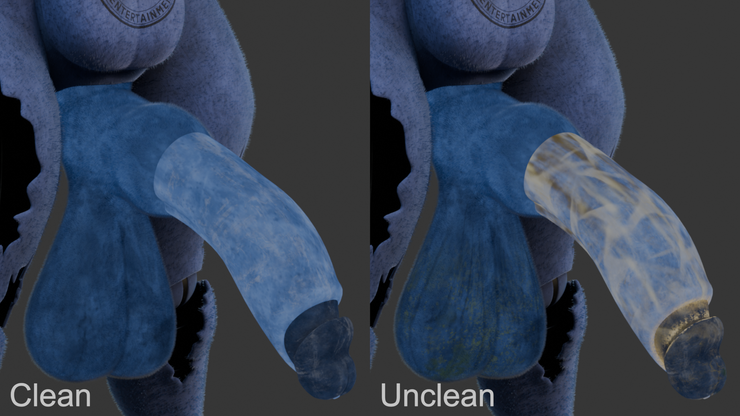
While the clean texture I made was mostly the same as what the model came with, I went a little ham with the unclean texture. I used smart masks and procedural noise to add layers of 'gunk', smegma and condensation, along with a bit of mold on the nutsack. As I can't draw very well I tend to use a more procedural method of texturing, which did cause some issues where I couldn't get it looking juuust right, but to complain would be to nitpick. Base colour comparisons. Bonnie's belly tattoo was done using separate UVs (all these comparison images are rendered in Cycles, so they may look a little bit different)
As a tangent, one thing that caused me a lot of grief was animating the veins. Because I wanted to animate separate veins, I used separate textures. But because Blender has no node for blending normalmaps I made them black-and-white to use as heightmaps which are easier to blend. But because Blender's way of using heightmaps without displacement looks terrible I had to make a whole convoluted node system in Substance Designer to convert the heightmaps into normalmaps without it looking crap, and then make a node setup in Blender to combine those normalmaps together xd
Clearcoat
While materials in most software have a roughness value which simulates how shiny or dull a surface is, clearcoat acts as a second roughness. Its often used for CGI cars, as it allows you to have a less-shiny base layer for the car paint with a shinier layer on top to recreate the protective coatings used on vehicles.
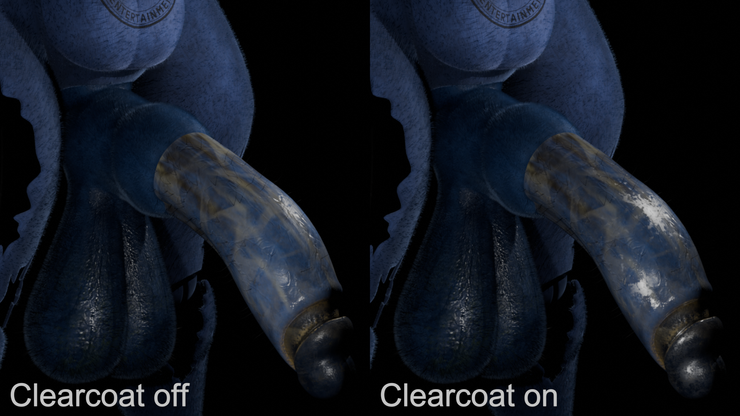
In this case, I decided to use it to represent the layers of grease, sweat and fluids that'd likely coat the animatronic's cock after being essentially left to rot! It was one of the first times I've used clearcoat, and fortunately I was able to easily set that up in Substance Painter. Clearcoat is rly good for adding an extra greasy film to things~ Clearcoat fortunately is supported in Blender by both EEVEE (game-style renderer) and Cycles (slow but high-quality pathtraced renderer) which was great, since I almost always use EEVEE when rendering my animations because while the lighting might be a bit less accurate, I'd rather have it take 5 hours to render rather than 30! Clearcoat has a bunch of inputs you can use, but I only went with a few of them, that being:
Weight input to determine what parts have clearcoat on them, like a mask.
Roughness input to determine how dull or reflective that coat is
IOR/index of refraction input which is a physics thing used to determine how much light reflects. I made it higher than usual.
I did also dabble in thin film as well (creates a slightly rainbowy effect commonly seen on things like oil) to make it look even greasier, but thats a Cycles-only effect right now, and there was always the chance it'd look odd or weird.
Hair
The hair was surprisingly easy! The main thing is that it takes a longer time to render because you could have tens or hundreds of thousands of strands in a scene. Thats why I never bothered to give the hair any simulation or adherence to gravity, because that would've been a nightmare! Plus, the fluid simulation is painful enough to do.
I used multiple layers to really flesh it out, that being the short fuzz that coated the entire model, the longer darker strands that protruded from the ballsack, and the few stringier hairs that dotted the shaft. I also did a little bit of grooming to make them look more disorganised.
For anyone looking to use hair, I HIGHLY advise making use of the display/render amount setting, as you can use it to turn 100 hairs in the viewport into 10,000 when rendering, which really saves on performance!
Drivers
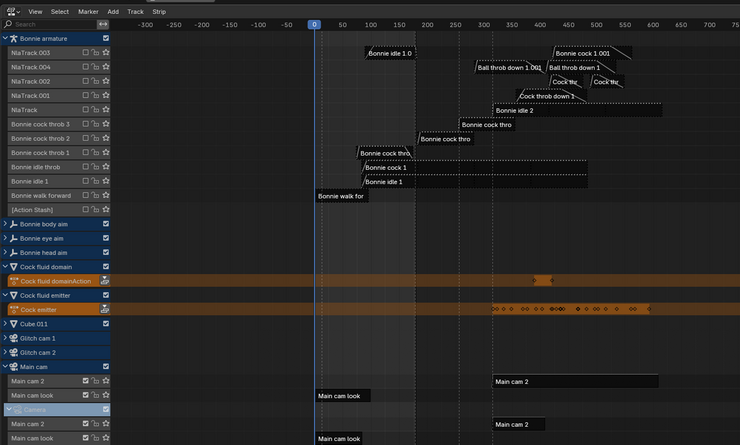
I love using the NLA (non-linear-action) editor as much as the next person for my animations... but it can be a bit tiresome sometimes. Everything can have an action and until the latest Blender version, all actions could only have one und exactly one thing in them, be it a material, object, armature, etc. As such, in order to transition between multiple loops that affected multiple rigs, model shapekeys, etc you would need to manage each character's armature, material and shapekey actions separately and make sure they all played back at the same time, and blended at the same time. This of course is a massive pain in the ass - though Blender 4.4 made it somewhat easier by allowing actions to now contain multiple things, though you still have to line them up and manage them like before. Behold, the animation's NLA timeline! So I kept as much of the animation as possible confined to the rig, because I wanted to avoid having a ton of other animated objects and shapekeys to manage. So how was I animating all the veins and cock shapekeys? Via drivers! Drivers are really cool, but I still know very little about how to fully utilise them. I simply made a new bone on the rig called something like "Vein control 2" and set it's z position to 0, then assigned drivers to the various ball tighten/sag shapekey and vein intensities telling them that "if [bone name]'s z position is 0, set yourself to 0 but if its set to 1, set yourself to 1". This allowed me to control veins and shapekeys via the rig, instead of needing to create and manage their separate actions (shapekeys can be especially annoying because they have their own separate action editor.
Blender's NLA editor is kinda old, but I recommend learning it because it can be incredibly useful! It took me a while to wrap my head around it, but I've been using it for my animations for at least 1.5-2 years now and its great. Blender has also been working on a major animation overhaul update (which the improved actions system was a part of), though its going to take some time to arrive.
Dynamic paint
I don't have much to say in terms of the fluid simulation (I use Flip Fluids because Blender's built-in tool is slow and old) or the smoke simulation (Blender's built-in tool is slow and annoying) but what was really fun was dynamic paint! I'd used it in the pool animation for the rippling water because it was LEAGUES easier than trying to do a fluid simulation, and I used it here for the bits of nutslop that hits the camera.
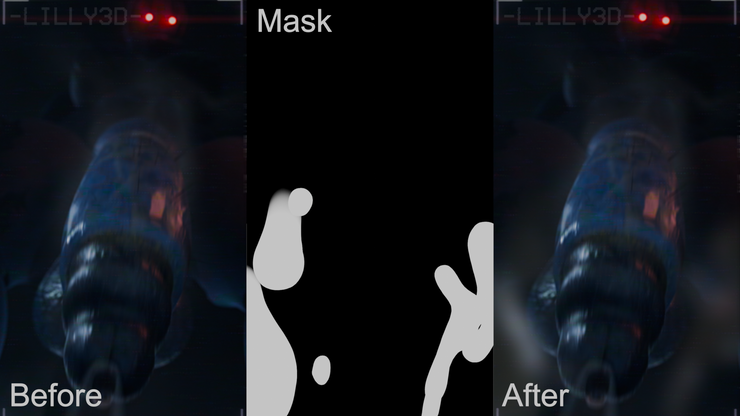
Dynamic paint essentially does what it says, it lets you paint onto a texture dynamically - so if you wanted to make an animation of someone painting blue onto a red wall, you can make the wall a 'canvas' and the brush a 'brush' which paints onto the canvas if the brush model is close enough. The result is a black-and-white image sequence which can be used as a mask to blend between the blue and red colours.
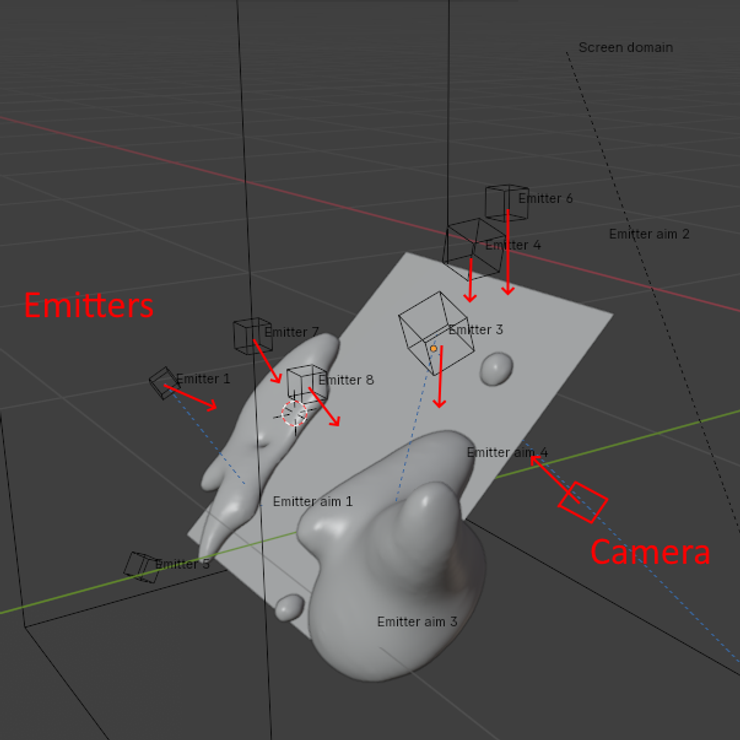
I made a separate .blend and set up a camera with a plane in front of it that'd act as the canvas, and placed fluid emitters behind that which would splatter fluid onto the canvas, which acted as a brush and would gradually smear as they slid down with gravity. By rendering the resulting black-and-white mask from the camera's perspective I could use that to blur parts of the image where the cum had landed. A very detailed, masterful diagram Compositing in After Effects I also roughly recreated the main light setup and rendered a separate version with the fluid looking all gooey so I could composite some lighting effects onto it as well.
The effect took a day or two to get right (while the cum itself probably took 3-4 due to how iterative and slow fluid sims are) but it worked out well! Though it does make me wish the simulation aspect of Blender was given some love rather than having to use these old systems or a community-made geometry node setup. My best guess is that they don't have a programmer on the team or in the development community that specialises in physics programming anymore :(
Conclusion
It took a while to get everything figured out, and the dynamic paint system caused a few crashes (though in hindsight I think that was my fault lol) but the project turned out well! Turns out a lot of my followers liked their cocks filthy, hairy and lightly-steaming, so that was good!
I plan to do more breakdowns in the future so feel free to let me know via the comments or on Twitter/Bsky if you think I could improve how I write these, or if you want me to focus on something specific!
And if you liked this or my work, feel free to support me here, or via Ko-Fi!
SubscribeStar and its trusted third parties collect browsing information as specified in the Privacy Policy and use cookies or similar technologies for analysis and technical purposes and, with your consent, for functionality, experience, and measurement as specified in the Cookies Policy.



 Log in